Setup .NET: Difference between revisions
No edit summary |
adding screen shots |
||
| Line 3: | Line 3: | ||
When installing or upgrading to Windows 10 online without an installation disc, .NET will not be installed. To add it: | When installing or upgrading to Windows 10 online without an installation disc, .NET will not be installed. To add it: | ||
* Use Cortana to search for Control Panel > Control Panel (click icon) | * Use Cortana to search for Control Panel > Control Panel (click icon) [[File:W10dotnet-01-searchCP.png|400px|thumb|right|Cortana search]] | ||
* Control Panel > click Programs and Features > click Turn Windows Features on and off (on the left side of Programs and Features window) | * Control Panel > click Programs and Features > click Turn Windows Features on and off (on the left side of Programs and Features window) | ||
* Click box beside “.NET framework 3.5 (includes .NET 2.0 and 3.0) and click OK | * Click box beside “.NET framework 3.5 (includes .NET 2.0 and 3.0) and click OK | ||
Revision as of 19:34, 30 July 2018
Windows 10
When installing or upgrading to Windows 10 online without an installation disc, .NET will not be installed. To add it:
- Use Cortana to search for Control Panel > Control Panel (click icon)
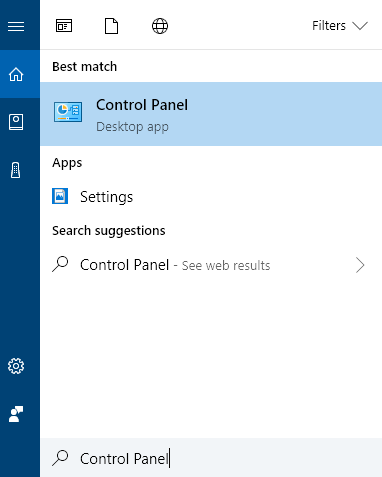
Cortana search - Control Panel > click Programs and Features > click Turn Windows Features on and off (on the left side of Programs and Features window)
- Click box beside “.NET framework 3.5 (includes .NET 2.0 and 3.0) and click OK
- select Download from Windows Update

Return to Management Suite installation instructions.