Home screen AX: Difference between revisions
Jodivandyke (talk | contribs) |
Toolbar gears, red top, clock symbols |
||
| (4 intermediate revisions by the same user not shown) | |||
| Line 1: | Line 1: | ||
<div style="font-size:84%"> '''[[Chime_Master_Help|Help]] » [[Operating manuals]] » [[:Category:AX_Manual|AX Table of Contents]]'''<br/> | <span class="crumbs"><div style="font-size:84%"> | ||
''' [[Login_screen_AX|← Previous Section]] [[Play_Selection_AX|Next section →]] '''</div> | '''[[Chime_Master_Help|Help]] » [[Operating manuals]] » [[:Category:AX_Manual|AX Table of Contents]]'''<br/> | ||
''' [[Login_screen_AX|← Previous Section]] [[Play_Selection_AX|Next section →]] ''' | |||
</div></span> | |||
The home screen presents the main menu for each user of the system. When the system is unlocked and displaying the home screen, the [[Amplifier_inSpire_AX|tower amplifier]] will also become active so selections will play immediately. | The home screen presents the main menu for each user of the system. When the system is unlocked and displaying the home screen, the [[Amplifier_inSpire_AX|tower amplifier]] will also become active so selections will play immediately. | ||
| Line 26: | Line 27: | ||
;System status indicator colors and icons: | ;System status indicator colors and icons: | ||
[[File:StatusIconsAX.png|frameless|right|180px]] | [[File:StatusIconsAX.png|frameless|right|180px|class=light-bg]] | ||
: You can tap this icon for text explanation of the following: | : You can tap this icon for text explanation of the following: | ||
: '''Blue''' for Standby | : '''Blue''' for Standby mode. | ||
: '''Yellow''' for Initializing (amplifier waking up) | : '''Yellow''' for Initializing (amplifier waking up). | ||
: '''Green''' for Ready | : '''Green''' for Ready. | ||
: '''Red''' for Muted (upper half outside, lower half inside zones) | : '''Red''' for Muted (upper half outside, lower half inside zones). If system is connected to a relay panel, a red top also indicates a fault condition. | ||
: '''Music note''' is displayed during selection play (tap icon to display title of selection) | : '''Music note''' is displayed during selection play (tap icon to display title of selection). | ||
: '''Keyboard icon''' is displayed when keyboard mode is active (automation is suspended) | : '''Keyboard icon''' is displayed when keyboard mode is active (automation is suspended). | ||
: '''Diagonal slash''' indicates that automation is suspended | : '''Diagonal slash''' indicates that automation is suspended. | ||
: '''Hour glass''' indicates amp initializing, swinging bells are coasting (Tower bells option) or the database is busy | : '''Hour glass''' indicates amp initializing, swinging bells are coasting (Tower bells option) or the database is busy. | ||
: '''Gears''' | : '''Gears''' schedule re-processing is triggered by recent changes. Processing is delayed by one minute to be sure the user isn't making additional changes to the schedule, albums or seasons. | ||
: '''!''' indicates tower clock is not responding. | |||
== User home menu == | == User home menu == | ||
Because there really is no limit to the number of buttons you can customize on the home screen, you may have to scroll the screen to see all of the selections. | Because there really is no limit to the number of buttons you can customize on the home screen, you may have to scroll the screen to see all of the selections. | ||
=== Quick function buttons === | === Quick function buttons === | ||
[[File:AXHomeCustomized.jpg|link=Customize_Home_AX|frameless|right| | [[File:AXHomeCustomized.jpg|link=Customize_Home_AX|frameless|right|300px]] | ||
The remaining buttons on the home screen are individually configurable on [[Customize_Home_AX|Settings Customize Home]] screen. They can be set to ring bells (specific) or play music (specific songs, random seasonal songs or randomly from an album of music). | The remaining buttons on the home screen are individually configurable on [[Customize_Home_AX|Settings Customize Home]] screen. They can be set to ring bells (specific) or play music (specific songs, random seasonal songs or randomly from an album of music). | ||
| Line 99: | Line 99: | ||
: brings up the system settings menu. | : brings up the system settings menu. | ||
< | <span class="crumbs"><div style="font-size:84%"> | ||
<div style="font-size:84%">''' [[Login_screen_AX|← Previous Section]] [[Play_Selection_AX|Next section →]] '''</div> | ''' [[Login_screen_AX|← Previous Section]] [[Play_Selection_AX|Next section →]] ''' | ||
</div></span> | |||
[[Category:AX Manual]] | [[Category:AX Manual]] | ||
Latest revision as of 15:36, 10 July 2025
The home screen presents the main menu for each user of the system. When the system is unlocked and displaying the home screen, the tower amplifier will also become active so selections will play immediately.
Toolbar

This toolbar appears at the top of the screen in all menus. From left to right its components are:
- Padlock
- Tap the padlock to lock the system before you walk away to prevent unauthorized tampering (system automatically locks after 15 minutes of inactivity from most screens)
- Front speaker control
- Tap the speaker to cycle through three volume settings: Mute, Quiet and Loud (Bravo and Millennium are On or Off). The default setting will revert the next time the system plays.
- Save the front panel speaker setting and fine level adjustment in Settings - Volume
- Back arrow
- Tap the back arrow to return to the previous screen
- Home
- Tap the home icon or Chime Master logo to return to your home screen
- Date and time information
- not touch enabled
- System status indicator colors and icons

- You can tap this icon for text explanation of the following:
- Blue for Standby mode.
- Yellow for Initializing (amplifier waking up).
- Green for Ready.
- Red for Muted (upper half outside, lower half inside zones). If system is connected to a relay panel, a red top also indicates a fault condition.
- Music note is displayed during selection play (tap icon to display title of selection).
- Keyboard icon is displayed when keyboard mode is active (automation is suspended).
- Diagonal slash indicates that automation is suspended.
- Hour glass indicates amp initializing, swinging bells are coasting (Tower bells option) or the database is busy.
- Gears schedule re-processing is triggered by recent changes. Processing is delayed by one minute to be sure the user isn't making additional changes to the schedule, albums or seasons.
- ! indicates tower clock is not responding.
Because there really is no limit to the number of buttons you can customize on the home screen, you may have to scroll the screen to see all of the selections.
Quick function buttons
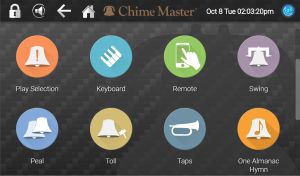
The remaining buttons on the home screen are individually configurable on Settings Customize Home screen. They can be set to ring bells (specific) or play music (specific songs, random seasonal songs or randomly from an album of music).
After tapping on one of these buttons, a confirmation window will pop up. Tap Yes to play now or No to cancel.
Factory default quick functions
These common manual play functions will be on your home screen on a new system. If they do not appear on your screen, they may have been removed.
- Swing
- for call to church - 1 minute (or until Stopped)
- Peal
- for weddings and festive services - 5 minutes (or until Stopped)
- Custom toll
- Select any available bell, number of tolls (or time duration) and tempo before ringing
- Suspend Schedule
- When the schedule is active, the button appears dark red and is labeled Suspend Schedule
- Tapping the button when it is red prompts you for an ending date and time for schedule suspension.
- When the schedule is suspended, the button appears dark green and is labeled Resume Schedule
- Tap the button when it is green to immediately resume scheduled ringing.
- Keyboard (Millennium and Platinum models)
- play the bells from your connected MIDI keyboard and make recordings to expand your library.
- Next Selection
- stops the current selection and begins playing the next selection (if more selections are in the play queue).
- Stop
- will stop the current selection and clear the play queue.
- Double clicking the lighted power button will also do this.
- Play Selection
- menu allows you to pick a song, then optionally specify an arrangement and an instrument.
- Almanac Music
- two songs from the SmartAlmanac's current season
- Hymns
- two songs from the General Hymns album
- Remote
- displays a QR code used to install the Remote Control on a smart phone or tablet.
Administrative features
These buttons will only appear on administrator home screens.
- Schedule
- brings up the scheduler menu.
- Settings
- brings up the system settings menu.