Settings screen AX: Difference between revisions
Explain image map for screen |
added Global |
||
| Line 11: | Line 11: | ||
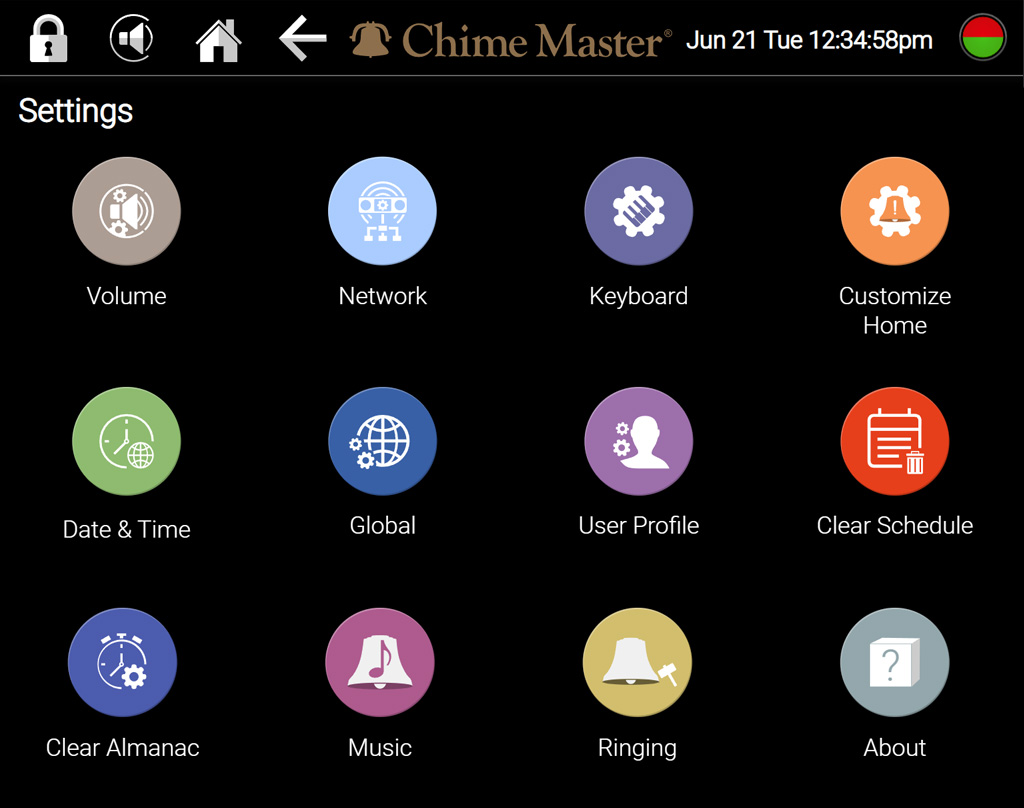
circle 890 205 115 [[Customize_Home_AX|Edit your home screen]] | circle 890 205 115 [[Customize_Home_AX|Edit your home screen]] | ||
circle 125 440 115 [[Date_and_Time_AX|Setting the date and time]] | circle 125 440 115 [[Date_and_Time_AX|Setting the date and time]] | ||
circle 380 440 115 [[Global_AX|Settings for all users]] | |||
circle 635 440 115 [[User_profile_setup_AX|Change your PIN]] | circle 635 440 115 [[User_profile_setup_AX|Change your PIN]] | ||
circle 890 440 115 [[Clear_schedule_AX|Clear Schedule]] | circle 890 440 115 [[Clear_schedule_AX|Clear Schedule]] | ||
Latest revision as of 20:39, 15 April 2026
Depending on your system model and user privileges, some of these buttons may be missing from your settings menu. Swipe up to scroll down to see all. Tap or click on a button on the screen shown below for instructions.