Customize Home AX: Difference between revisions
Edit or Add - include feature for button storage |
|||
| Line 54: | Line 54: | ||
You can edit your home screen remotely using Chime Center. Navigate to [https://chime.center/ax/#/manageusers '''Settings > User'''] (you may click this link if already logged in to Chime Center). | You can edit your home screen remotely using Chime Center. Navigate to [https://chime.center/ax/#/manageusers '''Settings > User'''] (you may click this link if already logged in to Chime Center). | ||
Click the edit button for the user for whom you wish to edit the home screen. | Normal and Power Users will only see their own account and Administrators see all users in a list. | ||
Click the edit button for the user for whom you wish to edit the home screen. On the edit screen click User Home Menu. The instructions above for the front panel screens work for the Chime Center screen. | |||
== Remote home screen == | == Remote home screen == | ||
Revision as of 15:23, 30 November 2020
Tap Settings on the home screen, then tap Customize Home on the settings menu. Add, remove and change Home Screen buttons and their functionality with this screen.

Tap Settings on the home screen, then tap Customize Home on the settings menu. Add, remove and change Home Screen buttons and their functionality with this screen.
All of the home screen buttons are shown on the Customize Home screen as labeled icons with either locks or editing buttons below them.
Essential home screen buttons have the locks below them and cannot be removed or edited. Customizable buttons provide both an Edit button and a trash bin below them.
Remove items
Remove unneeded buttons from the home menu by tapping the trash bin below them.
Edit or Add
Change the actions for an existing button by tapping its Edit button.
There are two ways to add a new button:
- Tap Button Storage
- Button storage contains buttons that exist on your system that are not on your home screen. These may have previously been removed from your screen or created by other users of your system.
- Tap Add New to create a Home Screen button.
- Tap Change Icon to see available icons for your function. Tap one of the icons then tap Select. Tap the Name field to create a unique label for your new button. Select the functionality of the button from one of the following Types.
Select Type
- Play Specific Selection
- The button will provide a quick concert from one to four specific titles. Options on the edit screen allow you to search within categorized lists to find your selection(s).
- Play Album
- The button will play from the selected Album. Choose to play through the Allbum in its entirety, for a duration of a number of minutes or a number of songs.
- Play using SmartAlmanac
- The button will play for a duration either of a number of minutes or a number of songs from the current SmartAlmanac™ season. Unlike other Types listed, these songs are specific to your denomination, settings and season of the year.
- Custom Toll
- The button will prompt you for either the number of strikes or minutes to toll, a tempo for the toll and select a tolling bell. All settings are saved for the next usage, so you can play without entering specific parameters.
- Keyboard screen
- Restore the keyboard button if it has previously been removed.
- Remote screen
- Restore the Remote button if it has previously been removed.
Review all of your selections by scrolling to the bottom of the page. When all of the parameters are entered tap the Save button at the bottom of the screen.
Exit
To exit and save your Home Screen customization, tap the Save Menu button.
Using Chime Center
You can edit your home screen remotely using Chime Center. Navigate to Settings > User (you may click this link if already logged in to Chime Center).
Normal and Power Users will only see their own account and Administrators see all users in a list.
Click the edit button for the user for whom you wish to edit the home screen. On the edit screen click User Home Menu. The instructions above for the front panel screens work for the Chime Center screen.
Remote home screen
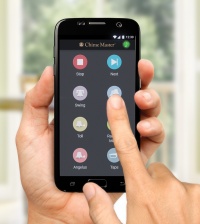
The customized home screen buttons will also appear on the smart phone Remote app with the Stop and Next buttons.
- iOS Note
- There may be some delay before these changes are recognized on your phone remote app. If you wish for these changes to take place immediately, simply restart your phone.
- Newer iOS versions may improve cache updating.
- Android Note
- Changes are typically reflected immediately on your phone remote app. If they are not, swipe downward on the screen to refresh your cache.