Advanced eXperience: Difference between revisions
links |
|||
| Line 10: | Line 10: | ||
Quickly access any feature you need with quick function buttons that you can customize with easily recognizable icons and colors. Create new buttons for special occasions. Set up your system and ringing schedules with simple screens. Organize your home menu with only the features you need. | Quickly access any feature you need with quick function buttons that you can customize with easily recognizable icons and colors. Create new buttons for special occasions. Set up your system and ringing schedules with simple screens. Organize your home menu with only the features you need. | ||
=== Remote Control App === | === Remote Control App === | ||
Simply tap the front touchscreen Remote button to view a QR code that you can scan with your smartphone. | Simply tap the front touchscreen [[Remote_AX|Remote]] button to view a QR code that you can scan with your smartphone. Doing so instantly installs the remote control app and authenticates your phone with your bell system. You can use this remote app to ring your bells with the same quick function buttons you set on your touchscreen. | ||
=== Chime.Center === | === Chime.Center === | ||
Access your schedules and settings from your home or office with the Chime Center management web portal. Available options include multiple user support where you can customize home screens for your staff on both the front panel touchscreen and their remote controls. Your system will regularly receive updates and upgrades. | Access your schedules and settings from your home or office with the [[Chime Center]] management web portal. Available options include multiple user support where you can customize home screens for your staff on both the front panel touchscreen and their remote controls. Your system will regularly receive updates and upgrades. | ||
=== SmartAlmanac AX === | === SmartAlmanac AX === | ||
Chime Master’s unique set-it-and-forget-it | Chime Master’s unique set-it-and-forget-it [[/Using_Chime_Center#Schedules_and_settings|SmartAlmanace]]<sup>™</sup> provides appropriate music automatically with seasonal changes year after year. With the Advanced Experience features of Chime Center you can add seasons, change their starting and ending dates and select seasonal music. Preview or review selection play lists and make adjustments to the SmartAlmanac song by song. | ||
== Available Models == | == Available Models == | ||
=== Specifications === | === Specifications === | ||
* [[Platinum_AX|'''Platinum AX<sup>™</sup> virtual bell instrument''']] | * [[Platinum_AX|'''Platinum AX<sup>™</sup> virtual bell instrument''']] | ||
* [[Millennium_AX|'''Millennium® AX carillon''']] | * [[Millennium_AX|'''Millennium® AX carillon''']] | ||
* [[Bravo_AX|'''Bravo AX<sup>™</sup> carillon''']] | * [[Bravo_AX|'''Bravo AX<sup>™</sup> carillon''']] | ||
{| class="wikitable" style="margin-left: auto; margin-right: auto; border: none;" | {| class="wikitable" style="margin-left: auto; margin-right: auto; border: none;" | ||
Revision as of 20:33, 20 August 2020

Advanced eXperience™ (AX) virtual bell instruments represent the leading edge of bell ringing technology. All Advanced eXperience™ instruments are made in Ohio by Chime Master.
Compelling features
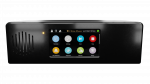
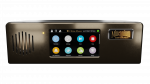
Front Panel Touchscreen
Quickly access any feature you need with quick function buttons that you can customize with easily recognizable icons and colors. Create new buttons for special occasions. Set up your system and ringing schedules with simple screens. Organize your home menu with only the features you need.
Remote Control App
Simply tap the front touchscreen Remote button to view a QR code that you can scan with your smartphone. Doing so instantly installs the remote control app and authenticates your phone with your bell system. You can use this remote app to ring your bells with the same quick function buttons you set on your touchscreen.
Chime.Center
Access your schedules and settings from your home or office with the Chime Center management web portal. Available options include multiple user support where you can customize home screens for your staff on both the front panel touchscreen and their remote controls. Your system will regularly receive updates and upgrades.
SmartAlmanac AX
Chime Master’s unique set-it-and-forget-it SmartAlmanace™ provides appropriate music automatically with seasonal changes year after year. With the Advanced Experience features of Chime Center you can add seasons, change their starting and ending dates and select seasonal music. Preview or review selection play lists and make adjustments to the SmartAlmanac song by song.
Available Models
Specifications
| Feature | Bravo™ | Standard Millennium® | inSpire Millennium® | Platinum™ |
|---|---|---|---|---|
|
|
|
| |
| Front Panel speakers | Single 3-watt | Single 15-watt | Single 15-watt | Dual 15-watt stereo |
| Chime Center subscription included | 1-Year Essential (upgradable) | 1-Year Managed (upgradable) | 1-Year Managed (upgradable) | 1-Year Premium |
| Audio package requirements | Value or Outreach1 | Value or Outreach1 | inSpire™ | inSpire™ |
| Outdoor speaker zones | one | one | one | Two directional or stereo |
| MIDI keyboard/organ input | N/A | Single manual | Single manual | Dual manual2 |
| Keyboard recording and MIDI file loading | N/A | YES | YES | YES |
| Audio file loading | no | no | no | YES |
| Available instrument combinations | 8 Equalized | 8 Equalized | 8 High Definition | 23 High Definition |
| Included liturgical ringing | 70+ | 70+ | 300+ | 300+ |
| Included musical selections (expandable) | Hundreds | Thousands | Thousands | Thousands |
| Music arrangements | 3 | 3 | 5 | 5 |
| Included clock chimes | Westminster | Westminster | Westminster | All available3 |
| Customer recorded clock chimes | no | YES | YES | YES |
| Other selections | Bugle:Taps Bagpipes:Amazing Grace |
Bugle:Taps Military option (20 more) Bagpipes:Amazing Grace Cemetery option (3 more) |
Bugle:Taps Military option (20 more) Bagpipes:Amazing Grace Cemetery option (3 more) |
All available options included |
| Tower bell interface option | no | YES | YES | YES |
| Outside clock interface option | no | YES | YES | YES |
- Notes
- 1 - These models can also be used with existing installed amplifier and speakers as they incorporate horn protection for Chime Master Value and Outreach audio systems. The Standard Millennium will be shipped for orders without an included inSpire audio package.
- 2 - Platinum supports two full five octave keyboards for simultaneous Carillon and Harp performance and recording.
- 3 - As of this specification date, Platinum comes with 13 clock chiming melodies
Tower bell controls
Libertas Advanced eXperience™
- Libertas AX™