Main Menu MS2201P: Difference between revisions
mNo edit summary |
No edit summary |
||
| (5 intermediate revisions by 3 users not shown) | |||
| Line 1: | Line 1: | ||
<div style="font-size:84%">'''[[Chime_Master_Help|Help]] > [[Operating manuals]] > [[Using_Management_Suite|Management Suite]]'''</div><br /> | |||
Click on the menu buttons below for instructions and descriptions for each Management Suite application. | Click on the menu buttons below for instructions and descriptions for each Management Suite application. | ||
<imagemap> | <imagemap> | ||
File:Suite-5-10-menu-2201ptr.png | |||
rect 0 34 146 139 [[Scheduler_weekly_MS|Weekly Scheduler]] | rect 0 34 146 139 [[Scheduler_weekly_MS|Weekly Scheduler]] | ||
rect 288 34 430 140 [[Jukebox_MS|Jukebox Concert]] | rect 288 34 430 140 [[Jukebox_MS|Jukebox Concert]] | ||
| Line 16: | Line 17: | ||
rect 146 350 288 460 [[Recording_library_MS|Recording Librarian]] | rect 146 350 288 460 [[Recording_library_MS|Recording Librarian]] | ||
rect 288 350 430 460 [[Tower_bells_setup_MS|Settings for Tower Bells Option]] | rect 288 350 430 460 [[Tower_bells_setup_MS|Settings for Tower Bells Option]] | ||
desc none | desc none | ||
</imagemap> | </imagemap> | ||
| Line 30: | Line 30: | ||
rect 146 140 288 245 [[Firmware_update_MS|Firmware Update]] | rect 146 140 288 245 [[Firmware_update_MS|Firmware Update]] | ||
rect 0 140 146 245 [[Library_update_MS|Music Library Update]] | rect 0 140 146 245 [[Library_update_MS|Music Library Update]] | ||
desc none | desc none | ||
</imagemap> | </imagemap> | ||
| Line 59: | Line 58: | ||
== Status Bar == | == Status Bar == | ||
Normally the left side of the status bar will say it is Ready. Some features require the | Normally the left side of the status bar will say it is Ready. Some features require the ringing system to enter a dedicated remote communications mode when writing to FLASH memory. Switching between FLASH and Ready modes may cause the controller to reboot, resulting momentary delay. The status bar at the bottom of the application screens indicates the current mode of the bell system. | ||
At the right end of the status bar you can see the schedule status. If a macro schedule has become active it will be displayed so you know which one is currently active. If the schedule edit mode has uploaded the schedule it will say Schedule Loaded. | At the right end of the status bar you can see the schedule status. If a macro schedule has become active it will be displayed so you know which one is currently active. If the schedule edit mode has uploaded the schedule it will say Schedule Loaded. | ||
Latest revision as of 13:51, 30 June 2020
Click on the menu buttons below for instructions and descriptions for each Management Suite application.
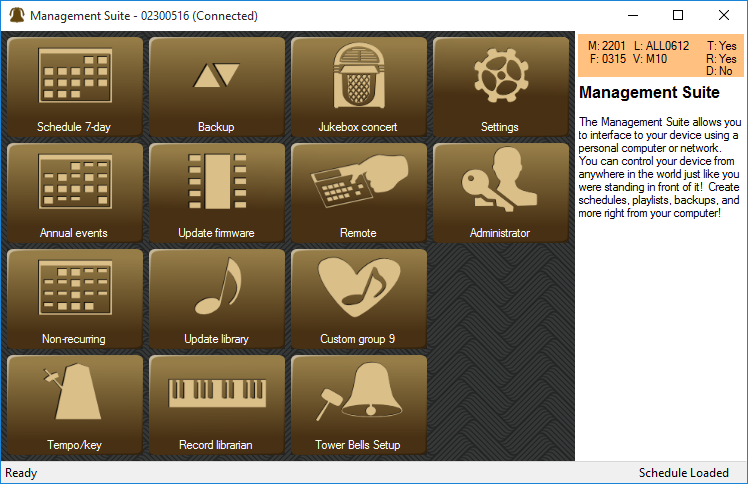
This is the Main Menu for Premium Management Suite connected to the Platinum Carillon with options for the recording librarian and tower bell control.
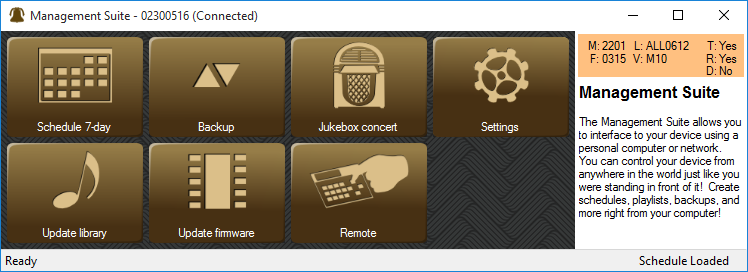
This is the Main Menu for the Free Management Suite.
Depending on the capabilities of your Chime Master system and its firmware revision, you may have fewer or additional buttons compared to the panels above.
Buttons will gray out if the carillon is in a mode that cannot support them (such as when it is playing).
Menu Customization
Right clicking your mouse in the button area of the main menu allows you to customize the menu. You can hide the details panel displayed on the right of the window, resize buttons and hide buttons you don’t use. The default button sizes are handy for a touch screen, but feel free to make them smaller if you always use a mouse.
Holding the left mouse button over an icon button allows you to re-position it in the menu.
Carillon Model Details
Other information pertaining to the connected carillon will be displayed in the upper right-hand box. A customer service representative may request these if you call for technical support. You can hide this box by right-clicking on the panel and de-selecting View-Details.
- M = Hardware Model
- F = Firmware Version (MMYY)
- L = Library Catalog Version
- V = Voices determines top level Model
- T = Tower Bells option (Y/N)
- R = Recording librarian option (Y/N)
- D = Clock Dial interface (Y/N)
Status Bar
Normally the left side of the status bar will say it is Ready. Some features require the ringing system to enter a dedicated remote communications mode when writing to FLASH memory. Switching between FLASH and Ready modes may cause the controller to reboot, resulting momentary delay. The status bar at the bottom of the application screens indicates the current mode of the bell system.
At the right end of the status bar you can see the schedule status. If a macro schedule has become active it will be displayed so you know which one is currently active. If the schedule edit mode has uploaded the schedule it will say Schedule Loaded.
Always make USB connections to the carillon before starting Management Suite. Allow a few seconds after connecting for the drivers to load.