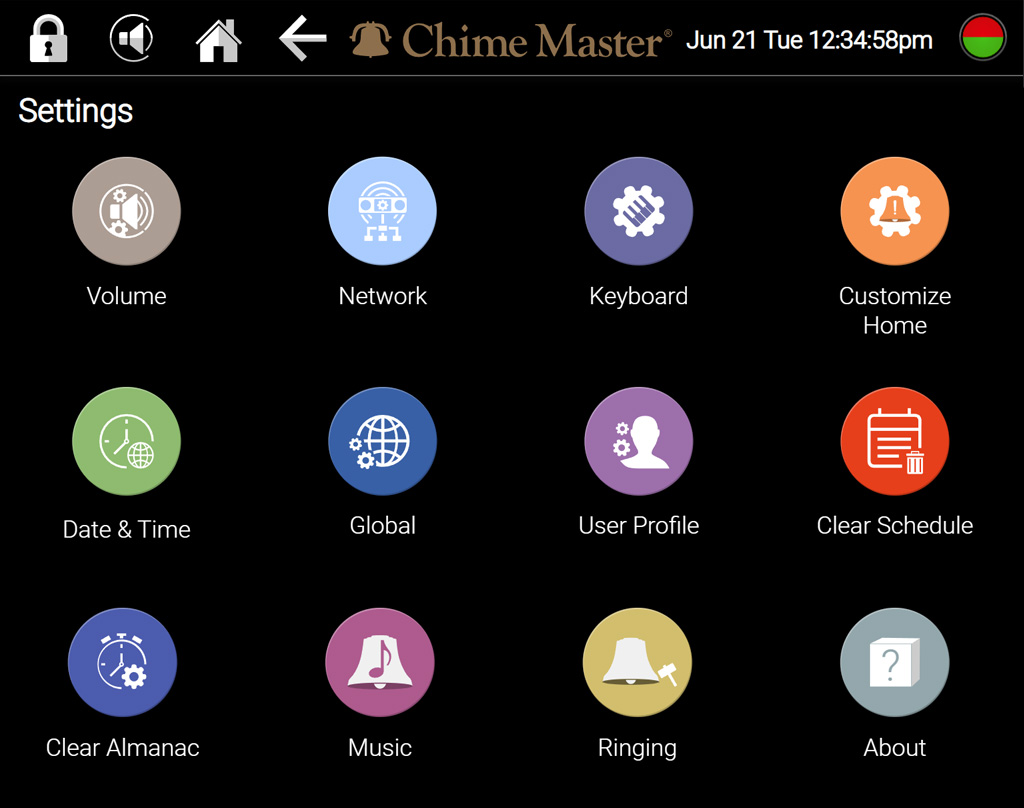
Depending on your user privileges, some of these buttons may be missing from your settings menu. Swipe up to scroll down to see all.
Depending on your system model and user privileges, some of these buttons may be missing from your settings menu. Swipe up to scroll down to see all. Tap or click on a button on the screen shown below for instructions.
<imagemap>
<imagemap>
File:Settings.jpg|frameless|right|600px
File:Settings.jpg
rect 0 34 146 139 [[Scheduler_weekly_MS|Weekly Scheduler]]
circle 125 205 115 [[Volume_setup_AX|Make changes to Volume settings]]
rect 288 34 430 140 [[Jukebox_MS|Jukebox Concert]]
circle 380 205 115 [[Network_setup_AX|Connect to the Internet]]
rect 288 140 430 245 [[Remote_MS|Remote Control Panel]]
circle 635 205 115 [[Keyboard_setup_AX|Specify keyboard settings]]
rect 429 33 571 141 [[Settings_MS2201|Settings]]
circle 890 205 115 [[Customize_Home_AX|Edit your home screen]]
rect 146 34 288 140 [[Backup_MS|Backup and Restore]]
circle 125 440 115 [[Date_and_Time_AX|Setting the date and time]]
rect 146 140 288 245 [[Firmware_update_MS|Firmware Update]]
circle 380 440 115 [[Global_AX|Settings for all users]]
rect 146 245 288 350 [[Library_update_MS|Music Library Update]]
circle 635 440 115 [[User_profile_setup_AX|Change your PIN]]
rect 430 140 573 249 [[Administration_MS|Administration]]
circle 890 440 115 [[Clear_schedule_AX|Clear Schedule]]
rect 0 140 146 350 [[Scheduler_special_Events_MS|Schedule Special Events]]
circle 125 645 115 [[Factory_reset_AX|Factory Reset]]
rect 288 245 430 350 [[Music_librarian_MS|Random Music Librarian]]
circle 380 645 115 [[Default_music_setting_AX|Choose your default music style]]
rect 0 350 146 460 [[Tempo_and_Transposition_MS2201|Change music tempo or key]]
circle 635 645 115 [[Default_ringing_setting_AX|Choose your default ringing style]]
rect 146 350 288 460 [[Recording_library_MS|Recording Librarian]]
circle 890 645 115 [[About_AX|Revision updates, acknowledgements & licenses]]
rect 288 350 430 460 [[Tower_bells_setup_MS|Settings for Tower Bells Option]]
default [[Image:Suite-5-10-menu-2201ptr.png]]
desc none
desc none
</imagemap>
</imagemap>
'''Buttons on the Settings screen'''
; [[Volume_setup_AX|Volume]]
: Set default volume levels
; [[Network_setup_AX|Network]]
: Connection settings and network status
;[[Keyboard_setup_AX|Keyboard]]
: MIDI channel and transposition
;[[Customize_Home_AX|Customize Home]]
: Add, remove and change home menu buttons
;[[Date_and_Time_AX|Date and Time]]
: Time zone and Auto Daylight settings
: Time setting/correcting if not connected to internet
; Global
: Lock screen preferences
; [[User_profile_setup_AX|User Profile]]
: Change access PIN
; Factory Reset
: Reset all settings and go through the guided setup menus to setup SmartAlmanac™ seasons and ringing schedule
; Clear Schedule
: This option currently clears all scheduled events (subject to change)
; [[Default_music_setting_AX|Default music]]
: Audition and select favored musical arrangement styles and instrumentation
; [[Default_ringing_setting_AX|Default ringing]]
: Audition and select instrumentation for bell ringing
; [[About_AX|About]]
: Revision and update information
: QR code link to online manual
: Credits, copyrights, licensing information and home page links for third party libraries and components
<div style="font-size:84%">'''[[Chime_Master_Help|Help]] > [[Operating manuals]] > [[:Category:AX_Manual|Millennium and Platinum AX]]'''<br/>
Depending on your system model and user privileges, some of these buttons may be missing from your settings menu. Swipe up to scroll down to see all. Tap or click on a button on the screen shown below for instructions.